

Table of Contents
Share On


Ikas Integration
This native integration with Ikas enables seamless order, catalog, and inventory synchronization.
Version: v1.0
Date: March 2, 2026
Owner: Sales Channel Product Team
Disclaimer: Screenshots of the Ikas Portal are used for demonstration purposes only. Ikas and the Ikas logo are trademarks of their respective owners.
1. Overview
What this integration does:
The Ikas integration connects your Ikas Sales Channel store with Omniful so that:
- Orders created through Ikas automatically sync to Omniful for processing.
- Inventory availability maintained in Omniful can be synced to Ikas.
- You can configure hub mapping and order status mapping, directly from Omniful.
2. Prerequisites
2.1 Sales Channel prerequisites
You will need:
- Store Name
- Client ID
- Client Secret
To obtain the above,
- Login to your Ikas dashboard
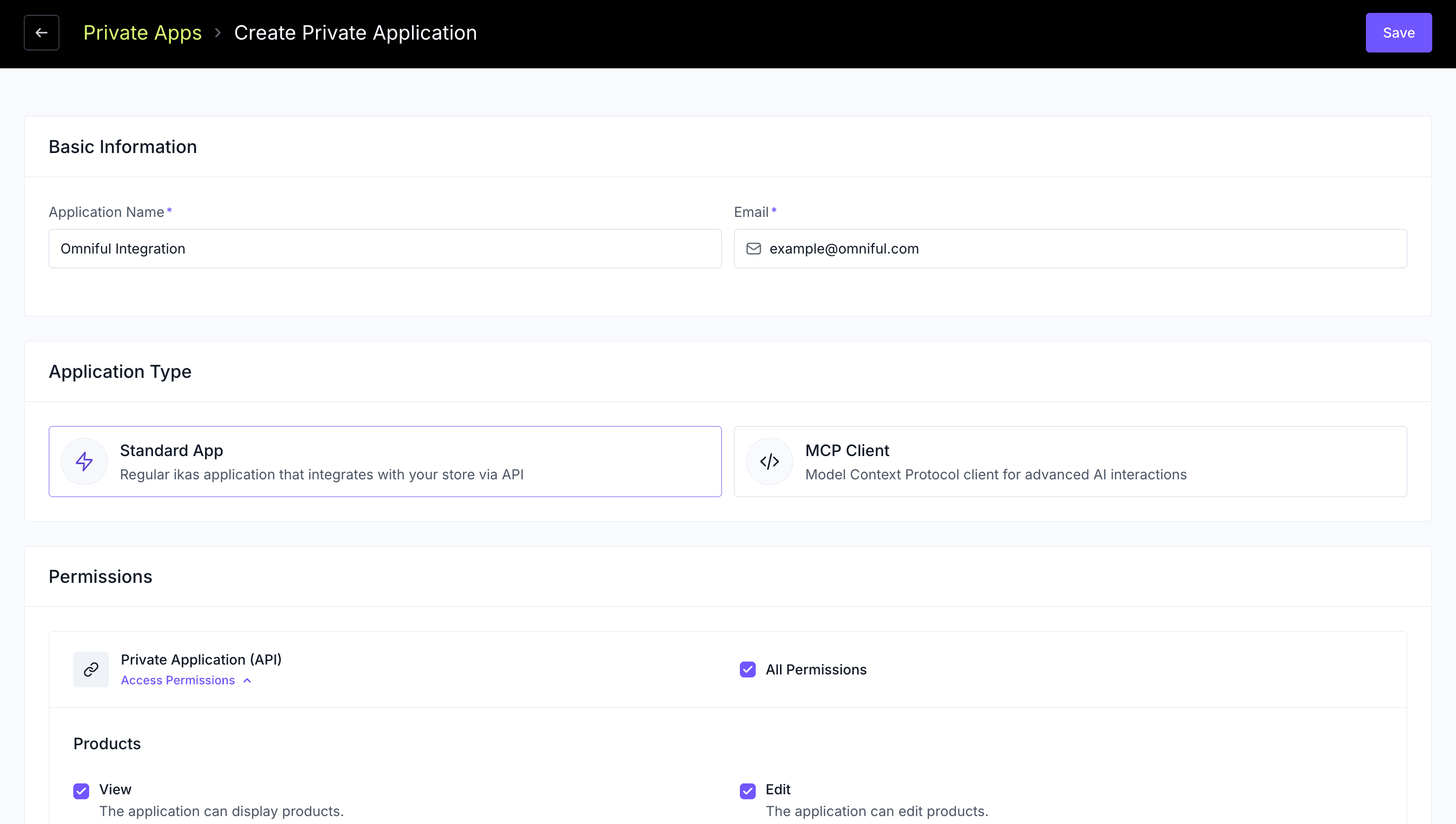
- Go to Apps > My Apps, then click on Go to Private Apps
- Click on Go To Private Apps, and Add a Private App
- Enter the required information and create an app of type Standard App
- Provide all the Private Application Permissions
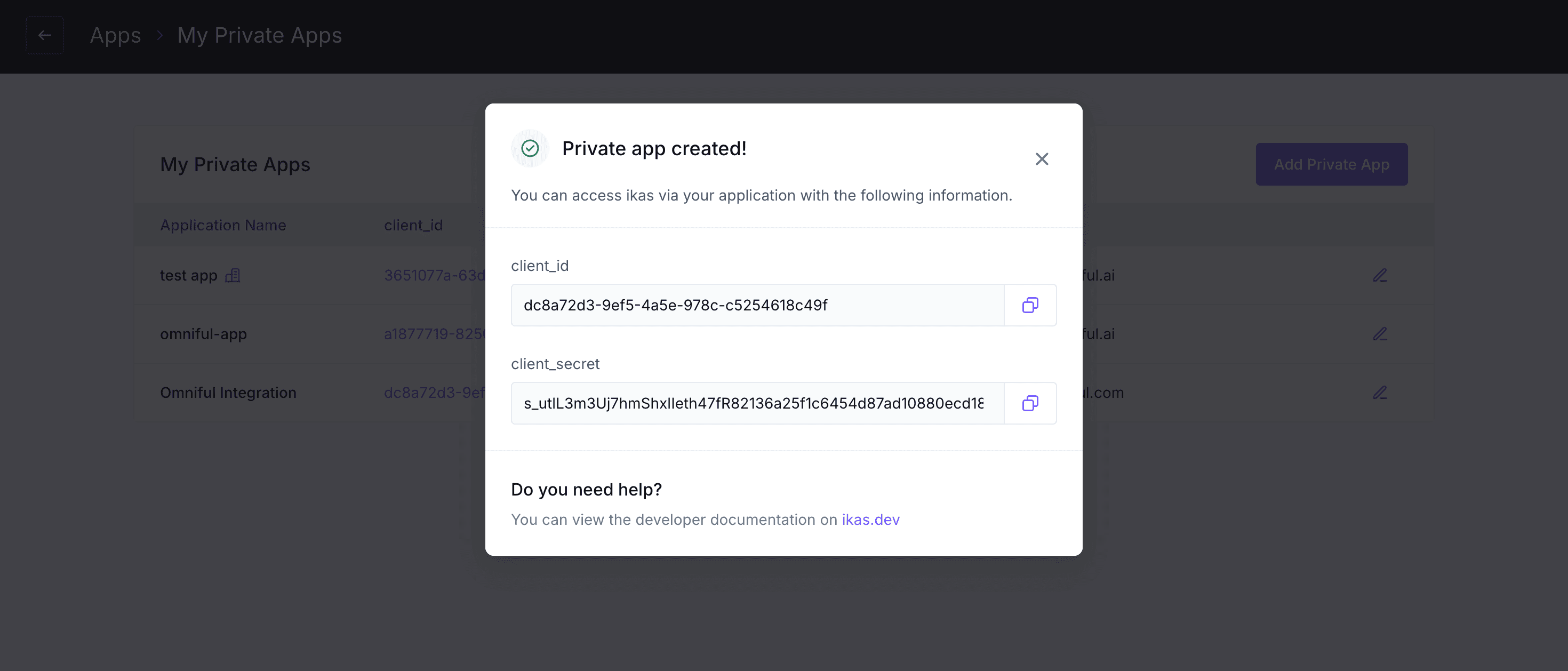
- You will now receive the client_id and client_secret for the newly created app.
3. Integration Methods and Setup
3.1 Connect Ikas store in Omniful
Once you have the required details:
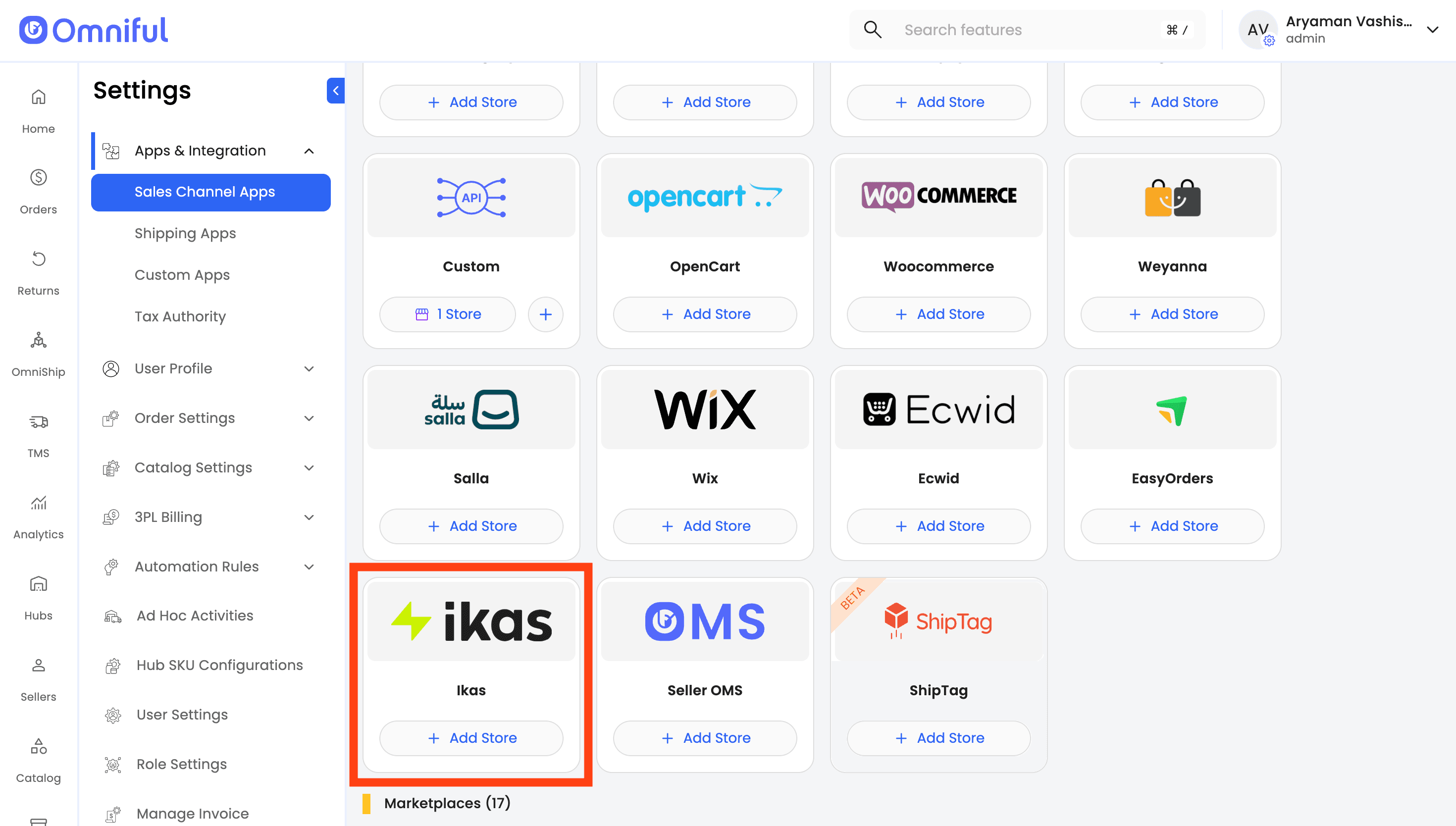
In Omniful, go to: Settings → Apps & Integration→ Sales Channel Apps / Stores.
- Select Seller and choose Ikas as the Sales Channel.
- Click Add Store
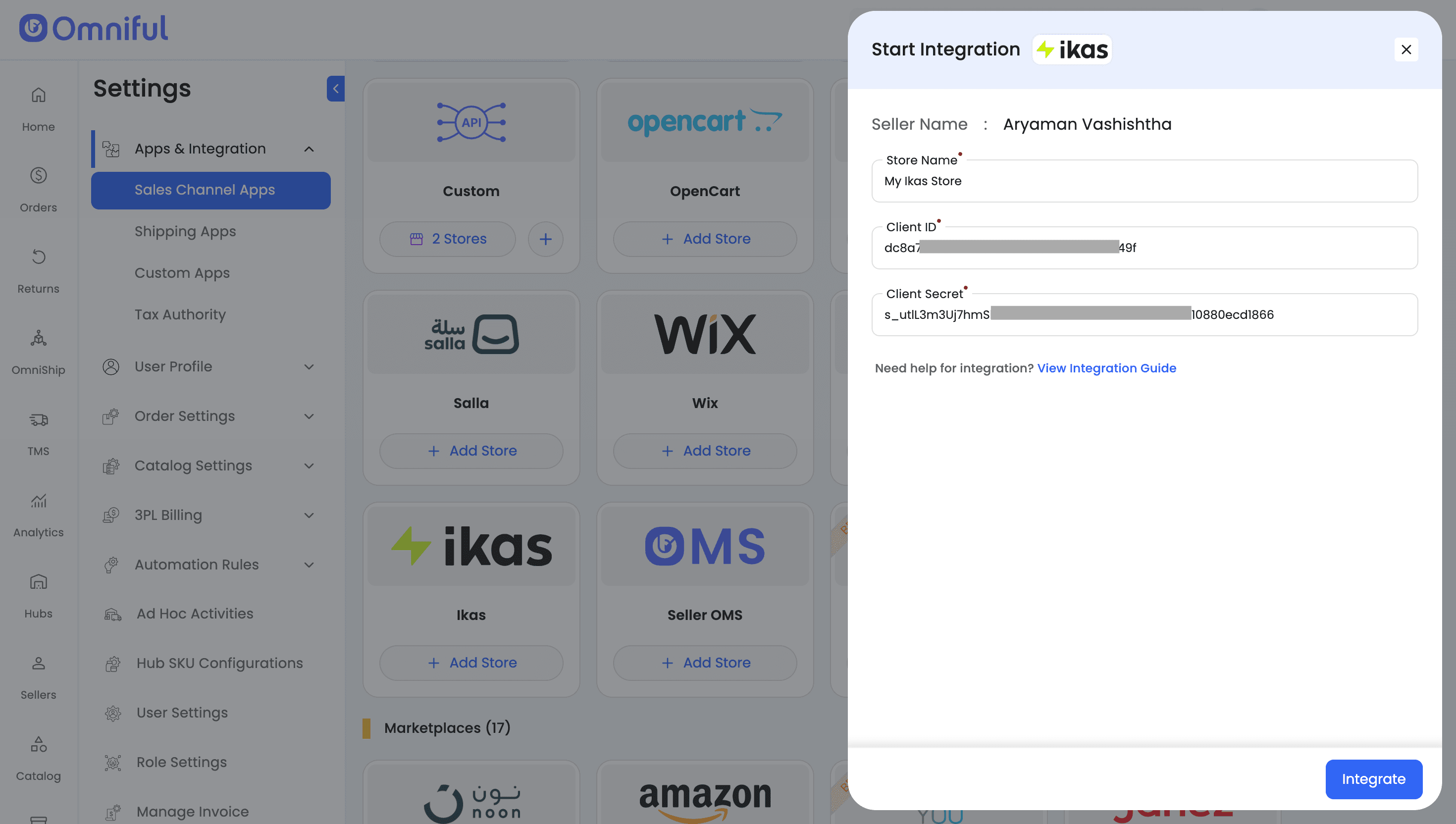
- Enter Store Name, Client ID, and Client Secret then click Integrate to complete the setup process.
4. Omniful Configuration
Once the store is connected, configure how data flows between Ikas and Omniful.
4.1 Store-level settings
Depending on your requirements, you can enable:
- Order Sync – Automatically fetch orders from Ikas to Omniful.
- Catalog Sync – Fetch catalog (SKUs) from Ikas into Omniful.
- Inventory Sync – Push available inventory from Omniful hubs to Ikas.
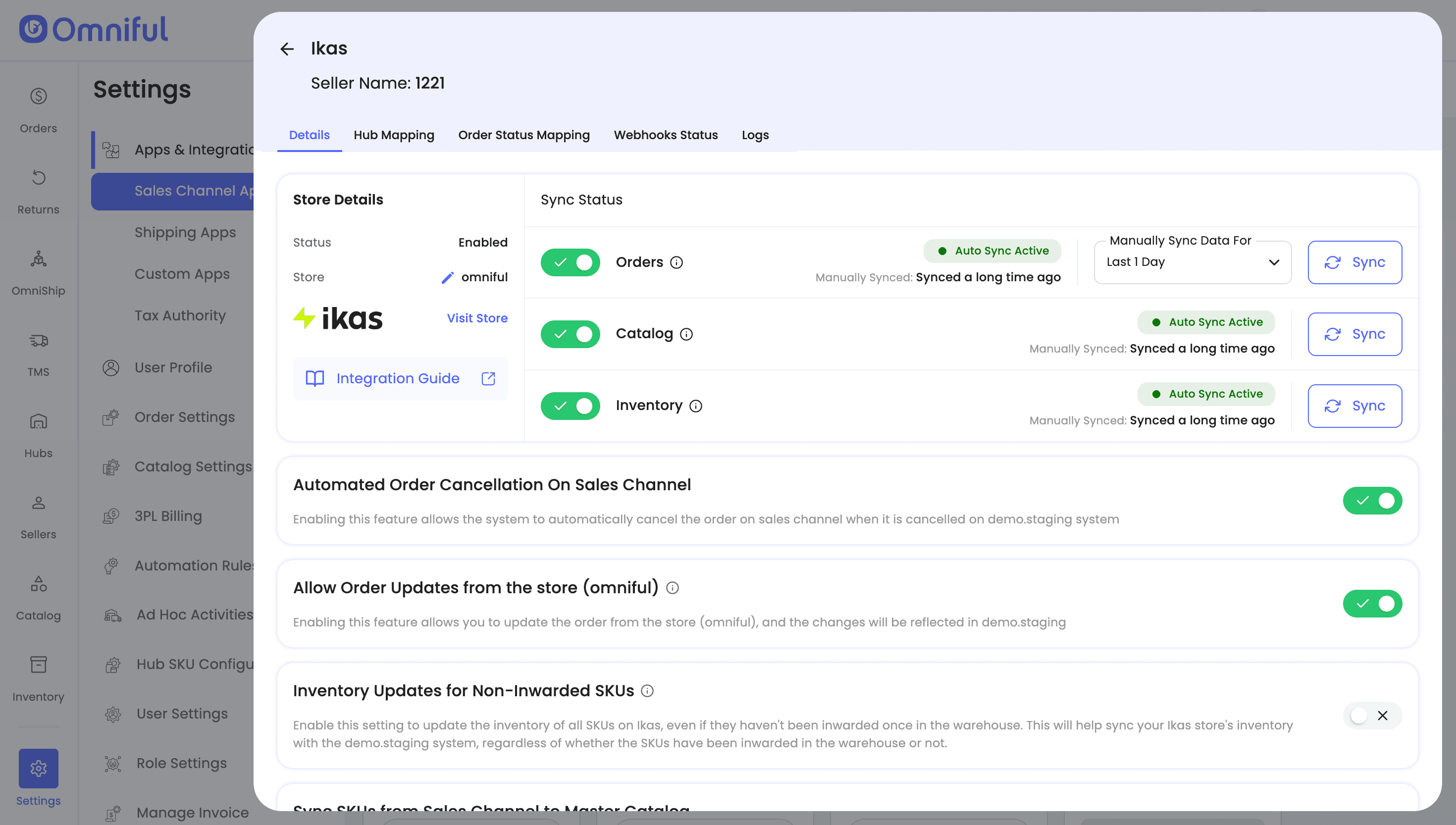
4.2 Hub Mapping
Configure how Ikas orders are routed to Omniful hubs:
- Map Omniful Hubs to the hubs configured in Ikas.
4.3 Order status mapping
Order Status Mapping defines how Ikas statuses and Omniful statuses stay in sync:
Sales Channel Mapping – Map incoming Ikas order statuses (e.g., Paid, Confirmed) to internal Omniful order lifecycle stages (e.g., New, Ready for Picking).
Workspace Order Mapping – Define which outgoing Omniful shipment/order statuses should be pushed back to Ikas. (for example, when the order is shipped or canceled).
Use Fetch Order Status within the configuration screen to load all available Ikas statuses and then map them to Omniful statuses per your operational requirements.
Note: ensure Ikas order statuses (such as Pending and Processing) are configured correctly—otherwise new orders may not sync to Omniful. Likewise, if the cancelled status is not mapped, cancelled orders will not sync back to Ikas.
5. Data and Sync Behaviour
5.1 Orders
Which orders sync
All orders for the mapped hubs will sync to Omniful.
Only orders with the mapped order statuses will be visible in Omniful.
5.2 Catalog
Seller’s Ikas store catalog (SKUs) with valid SKU code is fetched automatically to Omniful when Catalog Sync is enabled.
Omniful periodically fetches SKUs so you can see and use them for order & fulfillment processes in Omniful.
5.3 Inventory
Omniful automatically pushes and maintains inventory levels on the Ikas store when Inventory Sync is enabled.
5.4 Cancellations
Cancellations – When ‘Automated Order Cancellation On Sales Channel’ is enabled, canceling an order in Omniful triggers an automatic cancellation on Ikas, keeping both systems aligned.
6. FAQs
Q: My Ikas orders are not appearing in Omniful. What should I check? A: If orders are not syncing, verify the following:
- Order Sync is enabled in Store-Level Settings.
- The order’s Ikas status is mapped under Sales Channel Mapping (e.g., Ikas Pending → Omniful New).
Q: Does Omniful update inventory to Ikas automatically? A: Yes, if Inventory Sync is enabled, Omniful will send updated stock levels to Ikas for the SKUs in Omniful Master Catalog.
Q: Can Omniful cancel an Ikas order?
A: Yes, Omniful can send cancellation updates, but only if Ikas allows cancellation for that order status.
Q: Can I disable order sync without removing the Ikas store?
A: Yes, you can temporarily turn off Order Sync from the store configuration settings without disconnecting the integration.
Q: Can I sync inventory from Ikas to Omniful?
A: No. Inventory sync is one-directional — Omniful pushes inventory to Ikas, not the other way around.
Q: Can Omniful fetch historical orders from Ikas?
A: No. Only orders created after integration and matching your mapping rules will sync.