

Table of Contents
Share On


Trendyol MENA Marketplace Integration
This native integration with Trendyol MENA enables order, catalog and inventory synchronization seamless.
Version: v1.0
Date: December 29, 2025
Owner: Sales Channel Product Team
1. Overview
What this integration does
The Trendyol MENA integration connects your Trendyol MENA Marketplace store with Omniful so that:
- Orders created through Trendyol MENA automatically sync to Omniful for processing.
- Inventory availability maintained in Omniful can be synced to Trendyol MENA.
- You can configure hub mapping, order status mapping, directly from Omniful.
2. Prerequisites
2.1 Sales Channel prerequisites
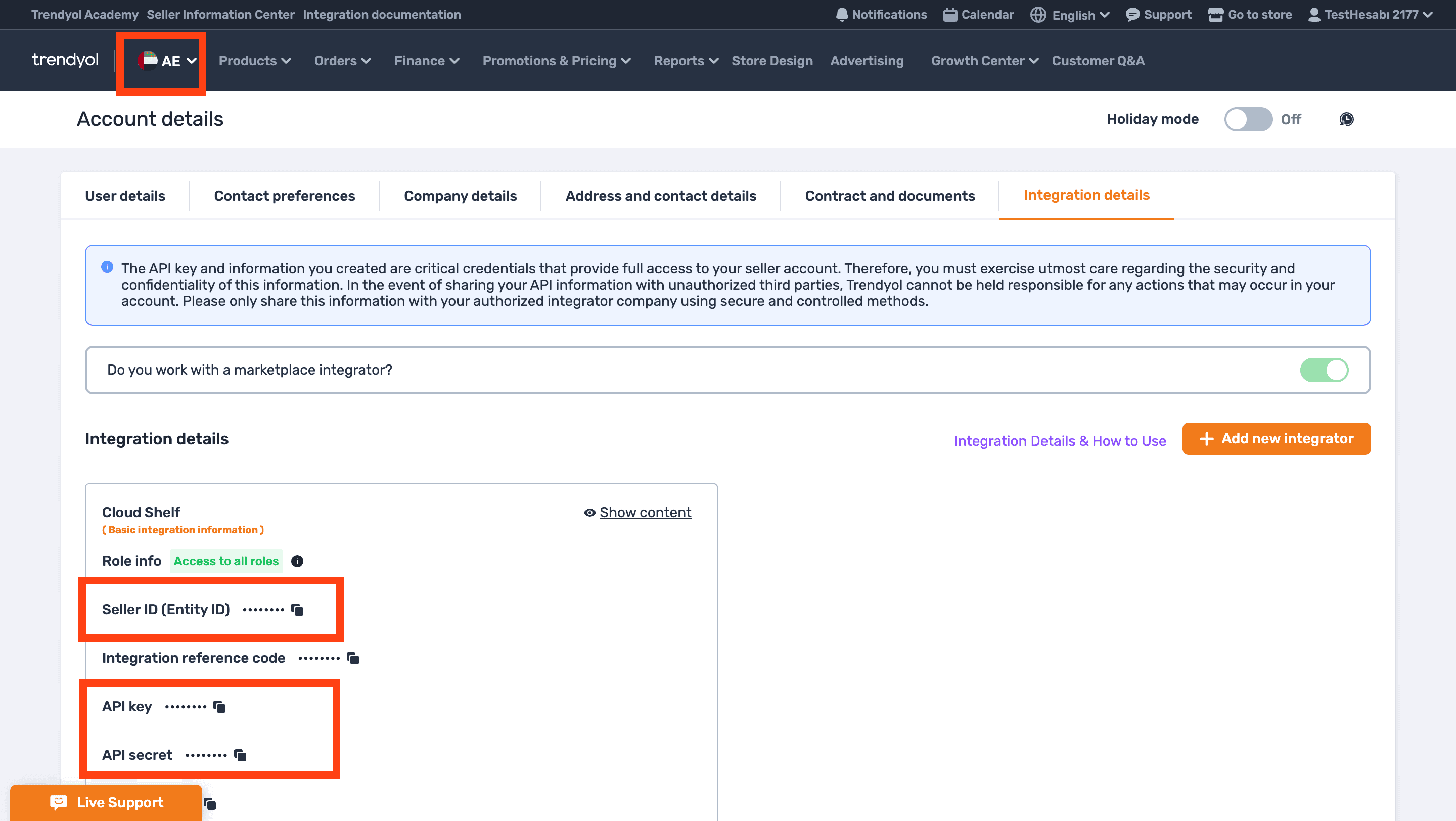
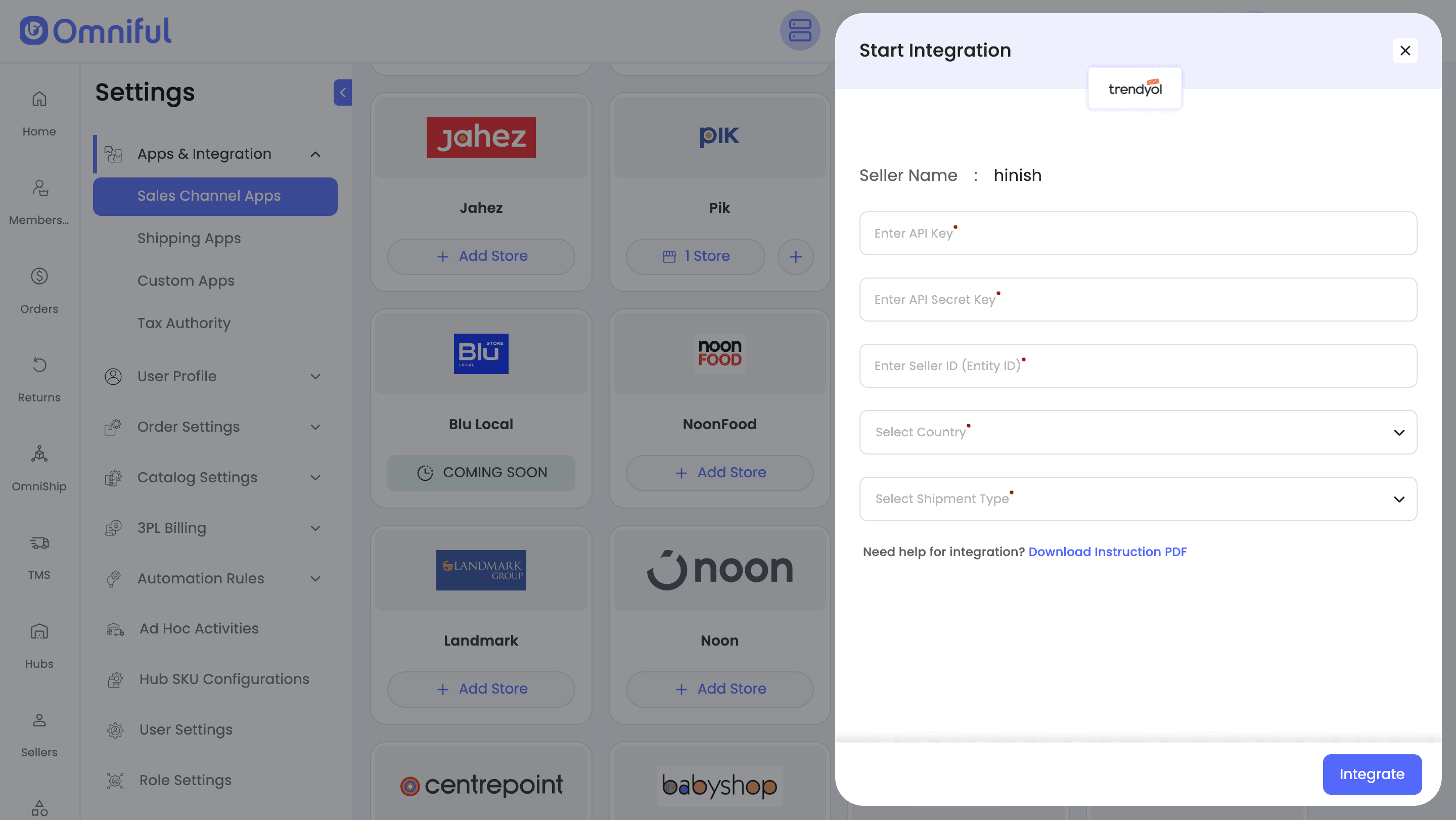
You will be required to obtain the following details from Trendyol MENA Store:
- API Key
- API Secret Key
- Seller ID (Entity ID)
- Country (Storefront Code)
- Shipment Type (Trendyol Pays / Seller Pays)
To obtain the above, go to Trendyol Seller Dashboard → Account Details → Integration Details.
3. Integration Methods and Setup
3.1 Connect Trendyol MENA store in Omniful
Once you have the required details:
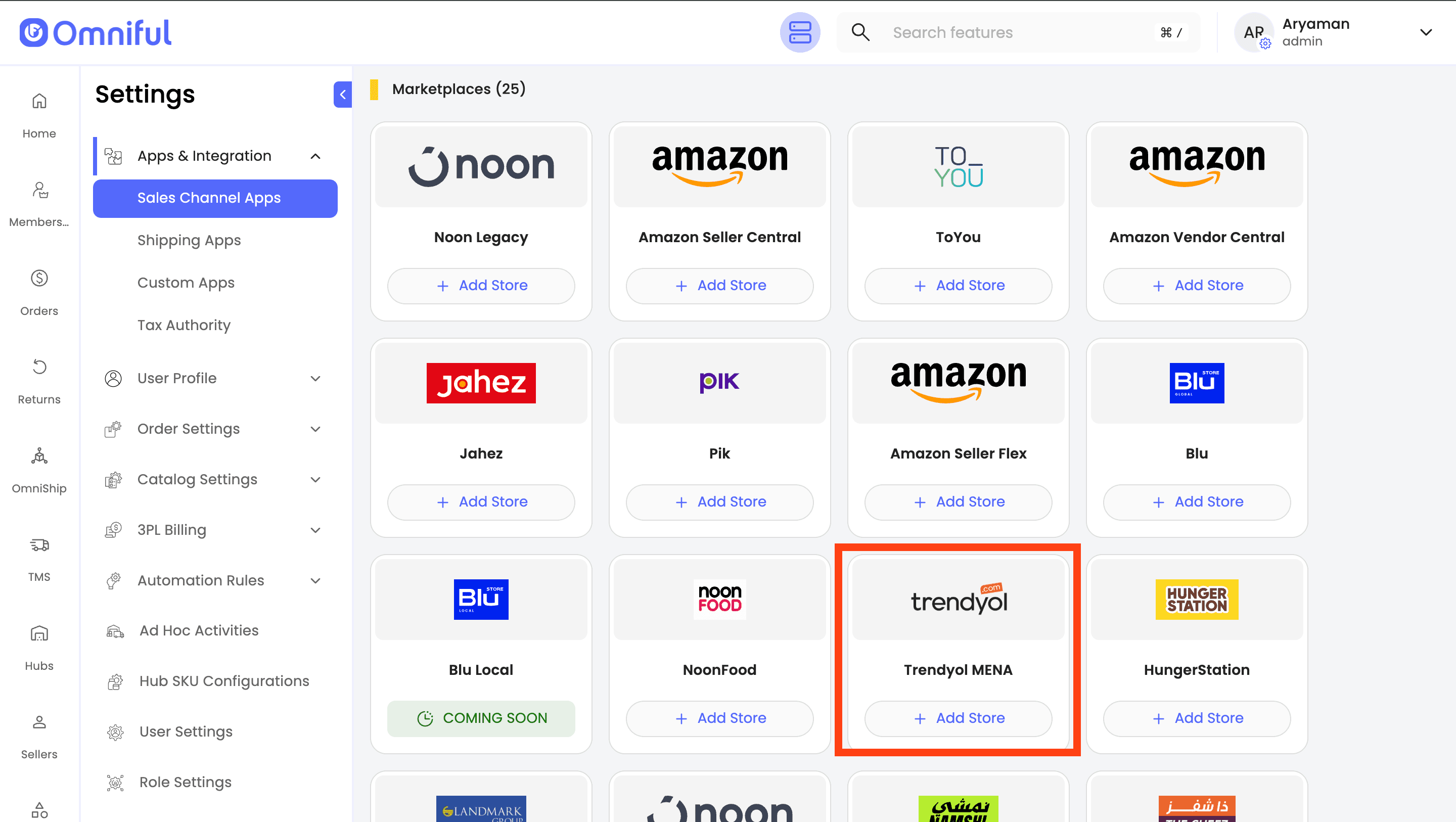
- In Omniful, go to: Settings → Apps & Integration → Sales Channel Apps
- Select Seller and choose Trendyol MENA from the marketplace section
- Click Add Store
- Enter all required information in the corresponding input fields. Click Integrate to complete the setup process.
4. Omniful Configuration
Once the store is connected, configure how data flows between Trendyol MENA and Omniful.
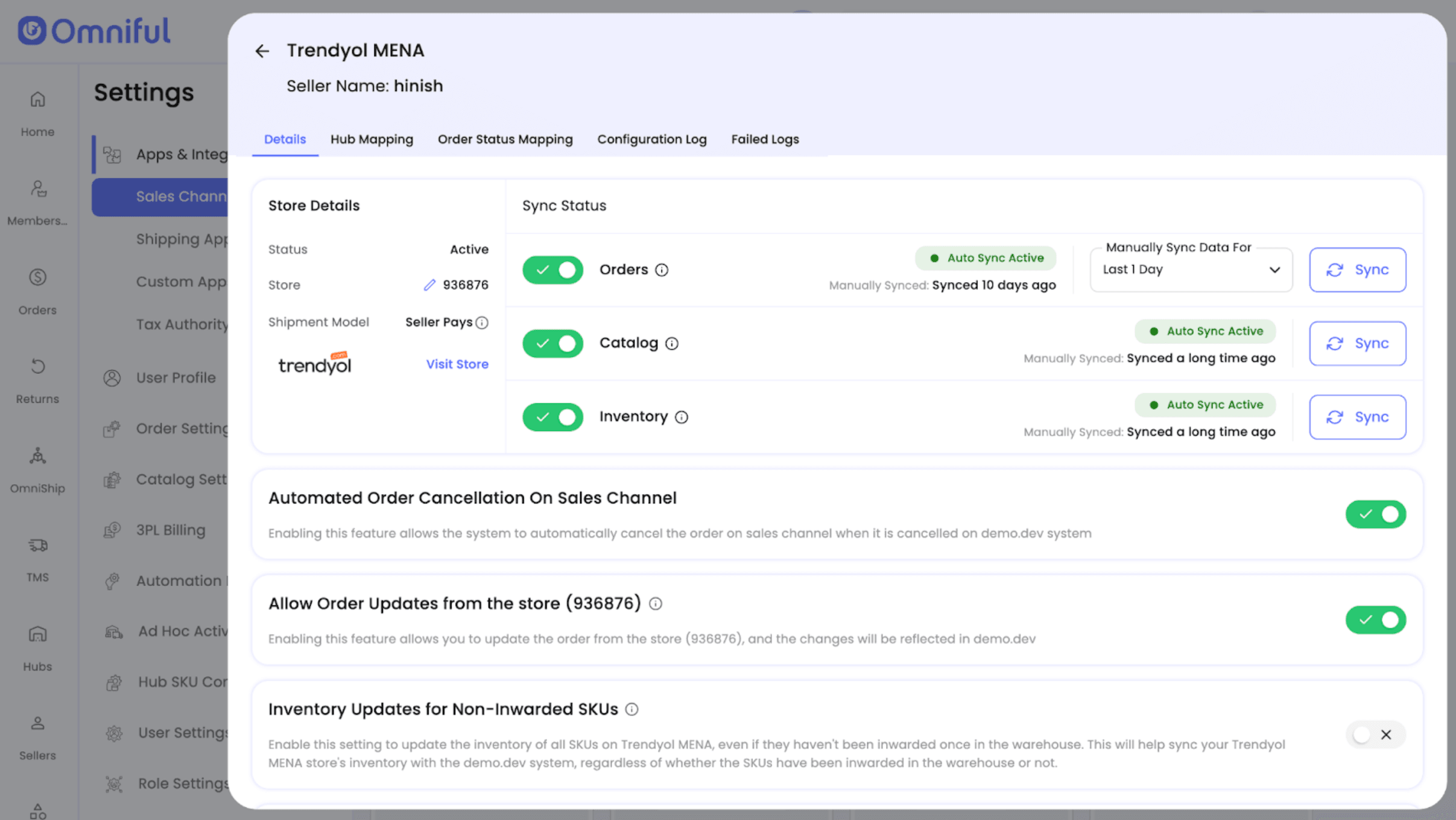
4.1 Store-level settings
Depending on your requirements, you can enable:
- Order Sync – Automatically fetch orders from Trendyol MENA to Omniful.
- Catalog Sync – Fetch catalog (Active and Live SKUs) from Trendyol MENA into Omniful.
- Inventory Sync – Push available inventory from Omniful hubs to Trendyol MENA.
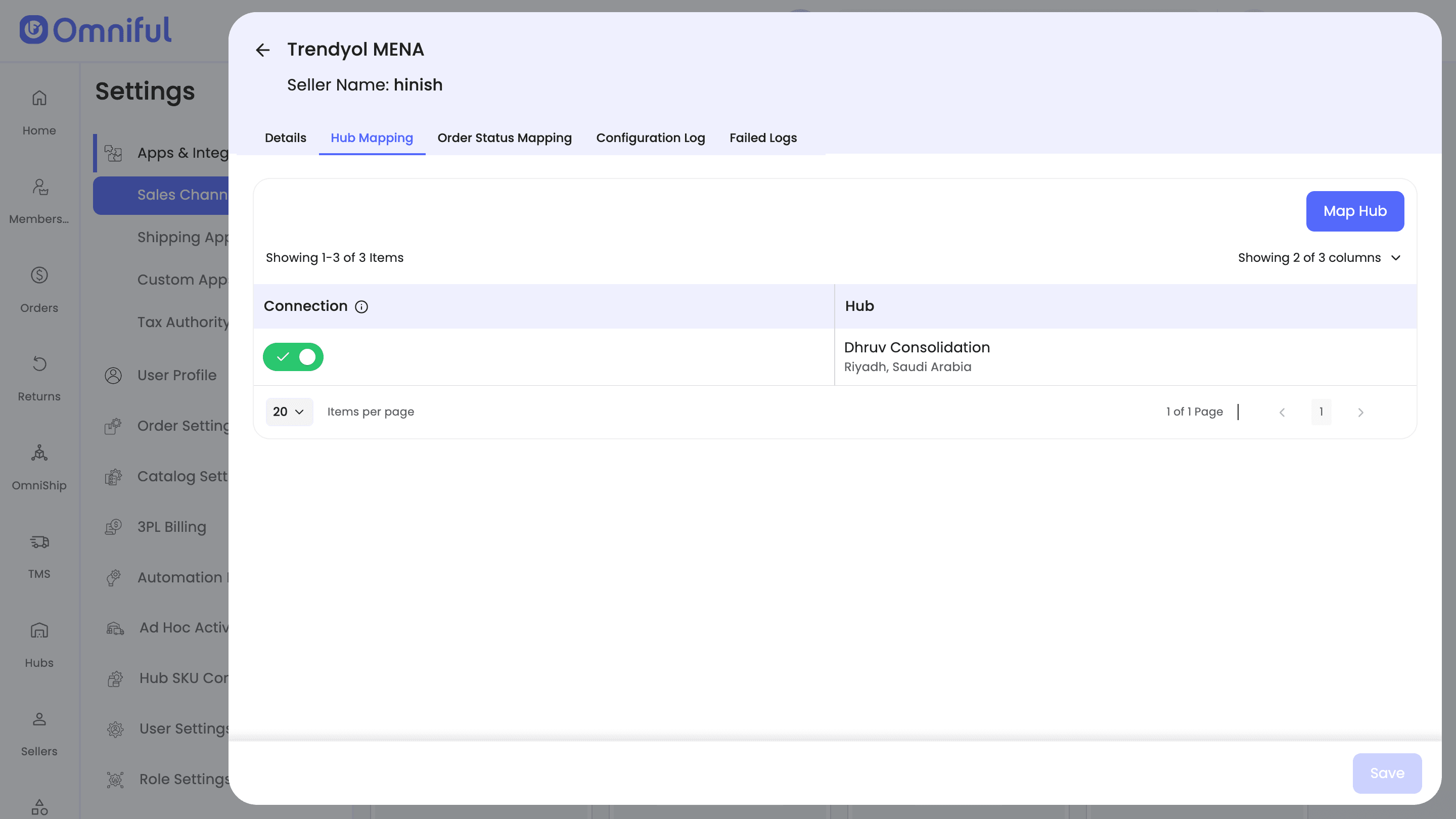
4.2 Hub Mapping
Configure how Trendyol MENA orders are routed to Omniful hubs:
- Map Omniful Hubs that can fulfill/ship Trendyol Orders.
4.3 Order status mapping
Order Status Mapping defines how Trendyol MENA statuses and Omniful statuses stay in sync:
Sales Channel Mapping –
Map incoming Trendyol MENA order statuses (e.g., Created, Invoiced) to internal Omniful order lifecycle stages (e.g., New Order, Cancelled).
Note: Ensure Trendyol MENA order statuses (such as Created and Invoiced) are configured correctly—otherwise new orders may not sync to Omniful. Likewise, if the Cancelled status is not mapped, cancelled orders will not sync back to Trendyol MENA.
Workspace Order Mapping –
Define which outgoing Omniful shipment/order statuses should be pushed back to Trendyol MENA (for example, when the order is Rejected or Cancelled).
5. Data and Sync Behaviour
5.1 Orders
Which orders sync
All orders with the mapped order statuses will be visible in Omniful.
5.2 Catalog
Seller’s Trendyol MENA store catalog (active SKUs) with valid Stock Code is fetched automatically to Omniful when Catalog Sync is enabled.
Omniful periodically fetches SKUs so you can see and use them for order and fulfillment processes in Omniful.
5.3 Inventory
Omniful automatically pushes and maintains inventory level on Trendyol MENA store when Inventory Sync is enabled and the hubs are mapped.
5.4 Cancellations
When Automated Order Cancellation On Sales Channel is enabled, canceling an order in Omniful triggers an automatic cancellation on Trendyol MENA, keeping both systems aligned.
6. FAQs
Q: My Trendyol MENA orders are not appearing in Omniful. What should I check?
A: If orders are not syncing, verify the following:
- Order Sync is enabled in Store-Level Settings.
- The order’s Trendyol MENA status is mapped under Sales Channel Mapping (e.g., Trendyol MENA (Created) → Omniful (New Order)).
Q: Why are cancellations from Omniful not reflecting on Trendyol MENA?
A: For Omniful → Trendyol MENA cancellations to sync back:
- “Automated Order Cancellation on Sales Channel” must be enabled.
- Omniful’s Cancelled order status is mapped to Trendyol’s Cancelled order status.
Q: Who is the inventory master?
A: Omniful is the inventory master. Enabling Inventory Sync pushes available stock from Omniful to Trendyol MENA.
Q: Who creates shipment of orders from Trendyol MENA store?
A: It depends on the shipment type configured at time of integration:
- If the shipment type is “Trendyol Pays”, then the shipment details are sent by Trendyol to Omniful.
- If the shipment type is “Seller Pays”, then the shipment details are sent by Omniful to Trendyol.