

Table of Contents
Share On


Skip Inventory Update
Skip Inventory Update is a store-level control that allows sellers to selectively stop Omniful from pushing inventory updates for specific SKUs to a connected sales channel.
Version: v1.0
Owner: Sales Channel Product Team
Summary
Skip Inventory Update is a store-level control that allows sellers to selectively stop Omniful from pushing inventory updates for specific SKUs to a connected sales channel.
This feature enables sellers to continue selling products on the sales channel even when inventory is unavailable or intentionally unmanaged in Omniful, by explicitly marking SKUs to be excluded from inventory synchronization.
The configuration is managed via a CSV upload, allowing bulk enablement or disablement of inventory updates at the SKU level.
To maintain operational visibility, SKUs for which inventory updates are skipped remain clearly identifiable within Omniful, ensuring sellers can track and manage them without ambiguity.
How it works
2.1 Navigation path
Go to Settings → Apps & Integrations → (Any Sales Channel / Marketplace) → Store settings
The seller uploads a CSV file containing SKU-level configuration in the Skip Inventory Update.
Each SKU includes a flag that controls whether inventory updates should be ignored.
Sellers can re-enable inventory updates for any SKU at any time using the same CSV flow.

2.2 SKU Visibility in Omniful
SKUs for which inventory updates are skipped continue to be visible across catalog views for transparency and operational awareness. These SKUs can be identified in:
Master Catalog → Listed on Sales Channels → 'Config Info' Column
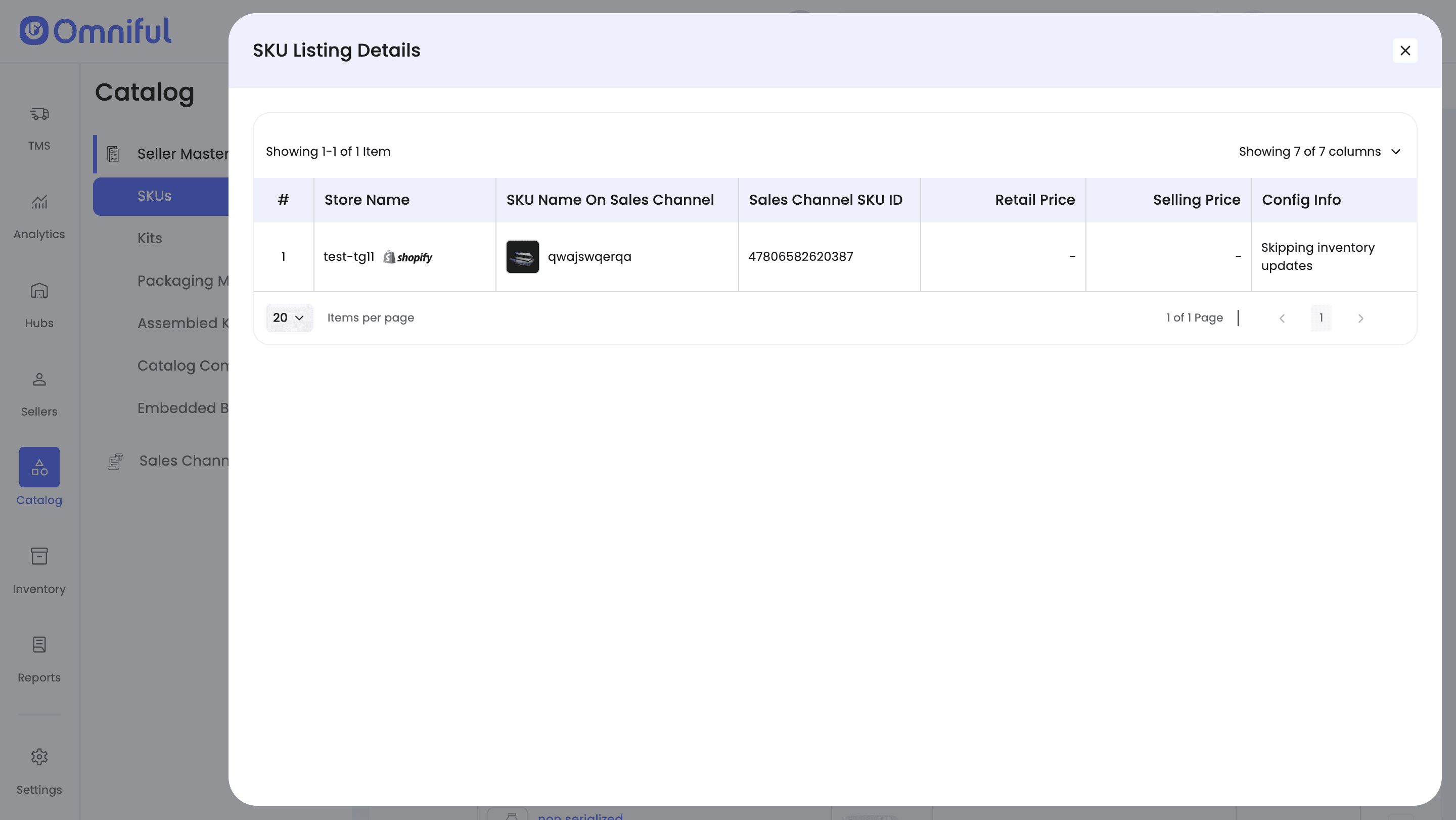
This ensures sellers have a clear view of which SKUs are excluded from inventory synchronization while managing catalog and sales channel operations.
Notes and Limitations
-
Sales Channel–only impact: Skipping inventory updates affects only the inventory sync sent to the sales channel. Inventory values within Omniful, order creation, fulfillment, and downstream operational workflows continue to function as usual.
-
Risk of overselling: When inventory updates are skipped, the sales channel may continue accepting orders even if stock is unavailable in Omniful. Sellers are responsible for ensuring fulfillment readiness for such SKUs.
-
CSV-driven control: The skip behavior applies only to SKUs explicitly included in the uploaded CSV. Any SKU not present in the file will continue to follow standard inventory synchronization rules.
-
No automatic safeguards: This feature does not auto-limit orders, adjust quantities, or trigger alerts. It is intended for intentional, seller-managed use cases such as audits, external inventory, or temporary exceptions.