

Table of Contents
Share On


SKU Activity Logs
Activity Logs provide a detailed audit trail of all changes made to catalog entities, including SKUs, Kits, and Assembled Kits.
Version: v1.0
Owner: Catalog Service Product Team
Summary
Activity Logs provide a detailed audit trail of changes made to catalog entities—Seller Master Catalog items (SKUs, Kits, Assembled Kits) and Sales Channel Listings (SKU-level listing records)—helping teams track what changed, when, how, and by whom.
Each log entry captures both high-level actions (such as SKU creation or update) and field-level changes, allowing users to quickly understand exactly what was modified without manually comparing versions.
Activity Logs are especially useful for:
- Debugging unexpected catalog changes
- Internal audits and operational reviews
- Cross-team visibility on catalog ownership and edits
How it works
2.1 Accessing Activity Logs
A) Seller Master Catalog (SKUs, Kits, Assembled Kits)
-
Navigate to Catalog → Seller Master Catalog → SKUs (or Kits / Assembled Kits)
-
Open any SKU / Kit / Assembled Kit
-
Switch to the Activity Logs tab
-
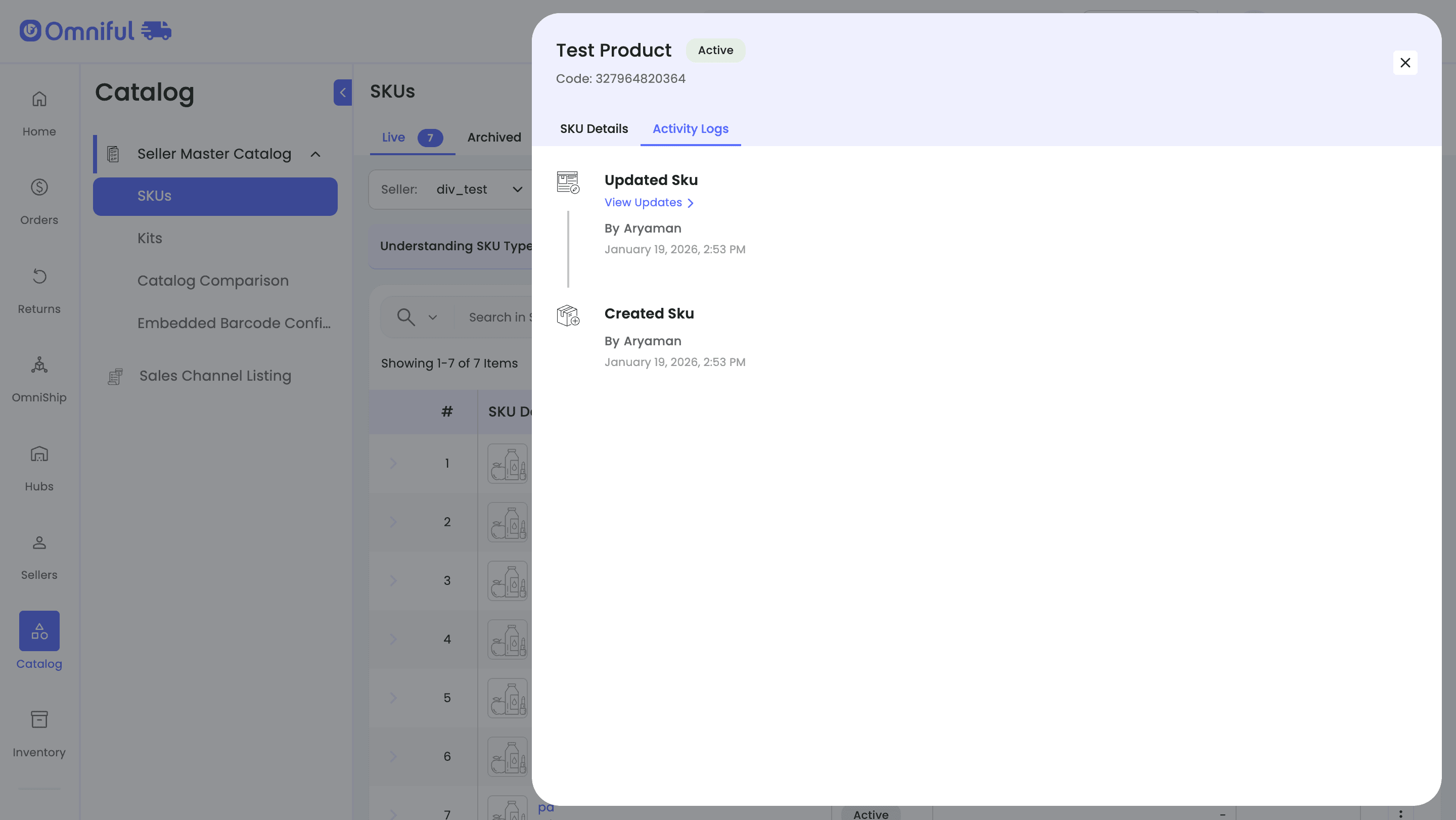
This view displays a chronological list of actions performed on the entity
B) Sales Channel Listings (Listing SKUs)
-
Navigate to Catalog → Sales Channel Listing
-
Open any SKU
-
Switch to the Activity Logs tab
-
This view displays a chronological list of actions performed on the Sales Channel Listing record, including Sales Channel-driven updates
2.2 Logged Events
For each SKU-related entity, the system records:
A) Seller Master Catalog entities
- Created SKU / Kit
- Updated SKU / Kit
- Archived SKU / Kit
- Unarchived SKU / Kit
B) Sales Channel Listings
- Created Sales Channel Listing SKU
- Updates coming from the Sales Channel sync (where applicable)
Each log entry shows:
- Action type (Created / Updated)
- User who performed the action
- Timestamp of the action
2.3 Viewing Field-Level Changes
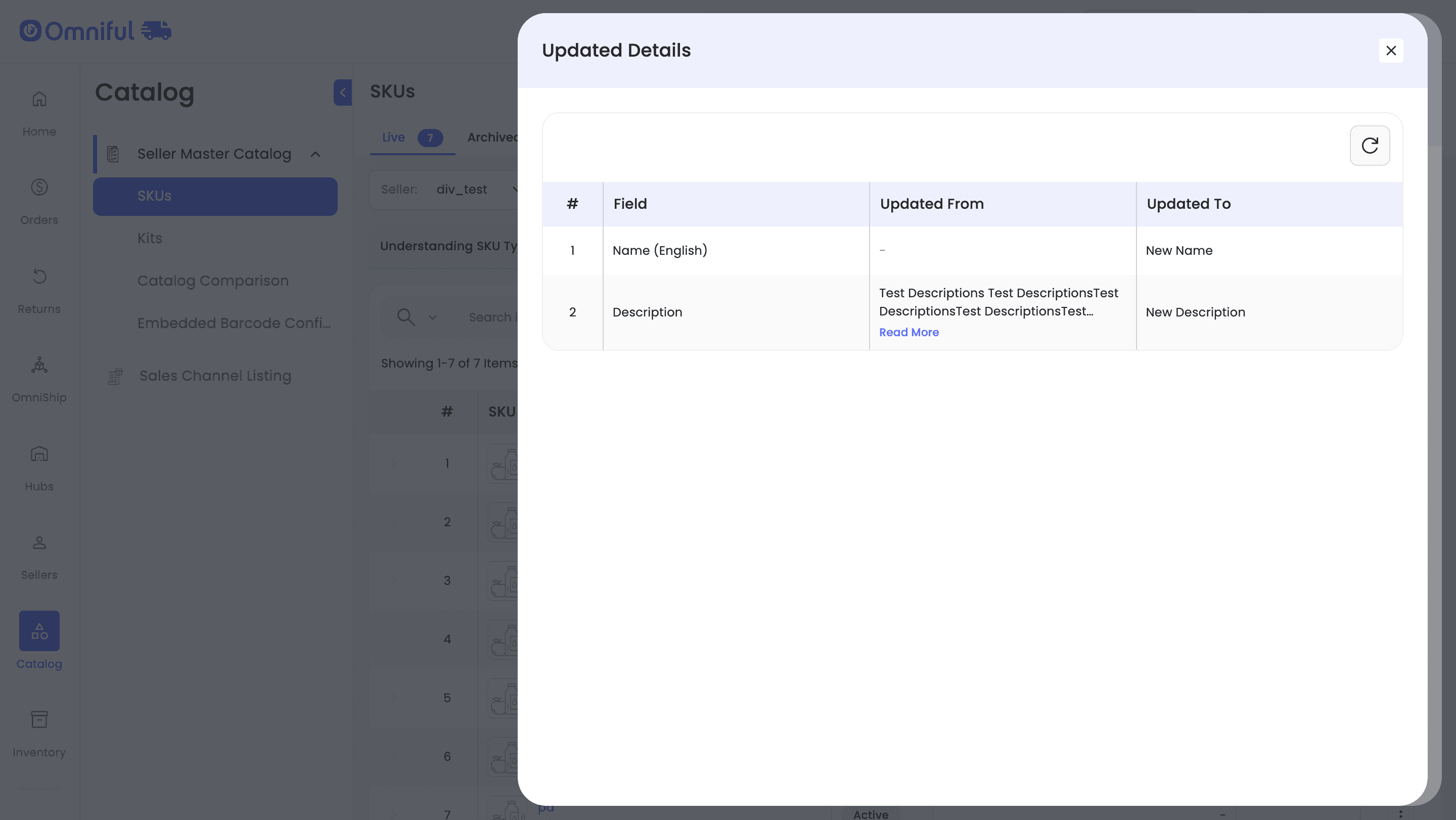
For update actions, users can click “View Updates” to open the Updated Details view.
This view displays:
- Field name that was modified
- Previous value (Updated From)
- New value (Updated To)
2.4 Scope of Tracking
Activity Logs apply to:
-
Seller Master Catalog: SKUs, Kits, Assembled Kits
-
Sales Channel Listings: Listing SKUs under Catalog → Sales Channel Listing
All updates made through supported workflows are captured with attribution wherever available.
Notes and Limitations
Historical data limitation:
Activity Logs are available only for changes made after this feature was released. Updates performed before the release are not retroactively captured.
Read-only logs:
Activity Logs are strictly informational and cannot be edited or deleted.
Change visibility:
Only fields that were actually modified are shown in the update details. Unchanged fields are not listed.
No rollback support:
Activity Logs do not provide a revert or rollback capability. They are intended for visibility and audit purposes only.
UI-based visibility:
Activity Logs are currently accessible via the dashboard UI and are not exposed as exportable reports or APIs.